![[EN]](data:image/png;base64,iVBORw0KGgoAAAANSUhEUgAAAB4AAAAUCAYAAACaq43EAAAAGXRFWHRTb2Z0d2FyZQBBZG9iZSBJbWFnZVJlYWR5ccllPAAAAyRpVFh0WE1MOmNvbS5hZG9iZS54bXAAAAAAADw/eHBhY2tldCBiZWdpbj0i77u/IiBpZD0iVzVNME1wQ2VoaUh6cmVTek5UY3prYzlkIj8+IDx4OnhtcG1ldGEgeG1sbnM6eD0iYWRvYmU6bnM6bWV0YS8iIHg6eG1wdGs9IkFkb2JlIFhNUCBDb3JlIDUuMy1jMDExIDY2LjE0NTY2MSwgMjAxMi8wMi8wNi0xNDo1NjoyNyAgICAgICAgIj4gPHJkZjpSREYgeG1sbnM6cmRmPSJodHRwOi8vd3d3LnczLm9yZy8xOTk5LzAyLzIyLXJkZi1zeW50YXgtbnMjIj4gPHJkZjpEZXNjcmlwdGlvbiByZGY6YWJvdXQ9IiIgeG1sbnM6eG1wPSJodHRwOi8vbnMuYWRvYmUuY29tL3hhcC8xLjAvIiB4bWxuczp4bXBNTT0iaHR0cDovL25zLmFkb2JlLmNvbS94YXAvMS4wL21tLyIgeG1sbnM6c3RSZWY9Imh0dHA6Ly9ucy5hZG9iZS5jb20veGFwLzEuMC9zVHlwZS9SZXNvdXJjZVJlZiMiIHhtcDpDcmVhdG9yVG9vbD0iQWRvYmUgUGhvdG9zaG9wIENTNiAoTWFjaW50b3NoKSIgeG1wTU06SW5zdGFuY2VJRD0ieG1wLmlpZDpERTc5MkI3RjE3OEExMUUyQTcxNDlDNEFCRkNENzc2NiIgeG1wTU06RG9jdW1lbnRJRD0ieG1wLmRpZDpERTc5MkI4MDE3OEExMUUyQTcxNDlDNEFCRkNENzc2NiI+IDx4bXBNTTpEZXJpdmVkRnJvbSBzdFJlZjppbnN0YW5jZUlEPSJ4bXAuaWlkOkEyMTE0RjIyMTc4QTExRTJBNzE0OUM0QUJGQ0Q3NzY2IiBzdFJlZjpkb2N1bWVudElEPSJ4bXAuZGlkOkRFNzkyQjdFMTc4QTExRTJBNzE0OUM0QUJGQ0Q3NzY2Ii8+IDwvcmRmOkRlc2NyaXB0aW9uPiA8L3JkZjpSREY+IDwveDp4bXBtZXRhPiA8P3hwYWNrZXQgZW5kPSJyIj8+60cYSwAAAyhJREFUeNrElN1PU3cYxz/tOQUBD/aNymtbUAq2IOiUWXmZA40Iy2BzcW53y7JlyZLtZuE/8NaY7Gbe7WJbdJnTDOdQCbLKrERUotgCSodQ7AsFpK28yKT7rfsL2gv7JCcn+eV3zpPv5/l+H9X2xp65SqtJGfr1Fg3vNPD02SIhfwRniwP3pdvsOVxPaCHGs7+DOA/VJs8crXXEs3P48OfTfMIcU+SRaqlMzm8SNut2VuefIxvyydZIxFbWyX35iviLNZRiPZJaxdLyCkoiQUyc6cwFTPvC9FRkcbJMy7JaTrmxHIuvxaZm5xW7+Jl3NkKRaRt5OVlMjvuoqa9gwr9AgS4PvTYP78hjdtVVEAw9J+Kdxv7Td+hL8tGTeslGg8Jeexk3/riLs62O+cU441NBDjbZGbg+SlNbPYvRF9zzzHCoycFA/yhvCtRqnZbr5a1YEjGm5S2po1ZXfRHVaCTlWLODq24v1eWFGPVbuXH5Dh3vORm88xhziR5zoZ5rl9y0dx/ggS/EzGSQs5Ua3s39h7CUlbri0mKdUGzmijBXqzBXYH4Z931fsmlf7zBvd+wjIigMDI/TcbyRvt+GOSgUZ62uU3S2h8IdRgrTQK1S2T6PyhpZ+aB9LxcF2hpbCUUF27hy4S+Of/wWfUMeykuNVIin9/xNuj9qYWR8juknIc5szNC1voA/DdSypayAhlor57/vp/NEC7OBRfpveek+0cwvP/7JsfedhEWcLg8+pOtkMxfOuTjc5WSrSc+S6ymSQYtGyk5dsVT9/4zbhZmu3Z5IztggXOwSZjvSuZ+hUR9mEan/KAz+PkJb5z7GngSYdXu46T9Ho3EL6ZSKnZ9Fax0W5aFrDNuB6mROA6El7BYTnns+bPt3srK2gV+QcIjIPRLzrxL3ZkLLfB0c40udRCAd1EfFNioxaSG+Sl2NmchSnCKjwh6HBWlzk/rd1uTyMOTn8MbuctRiieyqLKbKbqXs4gSvQmFephOnRCIRFW+F11yyp/3TtD/eSKjYTM4rjcZh110yUZlDPfnVqcwovkppRhRnDrX/2x+UjKDuJXcuE4r/FWAAjBMttNdoYOEAAAAASUVORK5CYII=)
One of the most effective ways to gather this feedback is through Net Promoter Score (NPS) surveys. NPS surveys help businesses measure customer loyalty and satisfaction by asking a simple question: "On a scale of 0-10, how likely are you to recommend our product/service to a friend or colleague?"
Automating NPS surveys in your tech stack can streamline the feedback process, save time, and provide real-time insights into customer sentiment.
In this step-by-step guide, we will walk you through the process of setting up automated NPS surveys in your tech stack.
1 - Choose the Right NPS Survey Tool
The first step in automating NPS surveys is to choose the right survey tool for your business. There are many NPS survey tools available in the market, such as SurveyMonkey, Qualtrics, and Delighted. Consider factors such as pricing, features, integrations, and customer support when selecting a tool.
2 - Integrate the NPS Survey Tool with Your CRM
Once you have chosen an NPS survey tool, the next step is to integrate it with your CRM system. This integration will allow you to automatically trigger NPS surveys based on customer interactions, such as making a purchase or contacting customer support.
Most NPS survey tools offer easy-to-use integrations with popular CRM systems like Salesforce, HubSpot, and Zendesk.

Recommended reading: Our blog article "Using NPS and CRM Integration for Business Success" explores the benefits of integrating NPS with CRM data.
3 - Set Up Automated Survey Triggers
After integrating the NPS survey tool with your CRM, you can start setting up automated survey triggers. Identify key touchpoints in the customer journey where you want to gather feedback, such as after a purchase, a support ticket resolution, or a product demo.
Configure the survey tool to send out NPS surveys automatically based on these triggers.

4 - Customize Your NPS Survey Questions
Personalize your NPS survey questions to gather more specific feedback from customers. In addition to the standard NPS question, you can include follow-up questions to dig deeper into the reasons behind the customer's score.
For example, you can ask what the customer liked or disliked about your product/service, or how you can improve their experience.
5 - Analyze and Act on Feedback
Once you start receiving NPS survey responses, it's crucial to analyze the feedback and take action accordingly. Most NPS survey tools provide analytics dashboards that allow you to track trends, identify areas for improvement, and measure the impact of your customer experience initiatives. Use this data to make informed decisions and enhance customer satisfaction.

Recommended reading: Our blog article "Improving NPS Survey Response Rates - Strategies for Success" discusses how to get more NPS survey responses.
6 - Follow Up with Promoters and Detractors
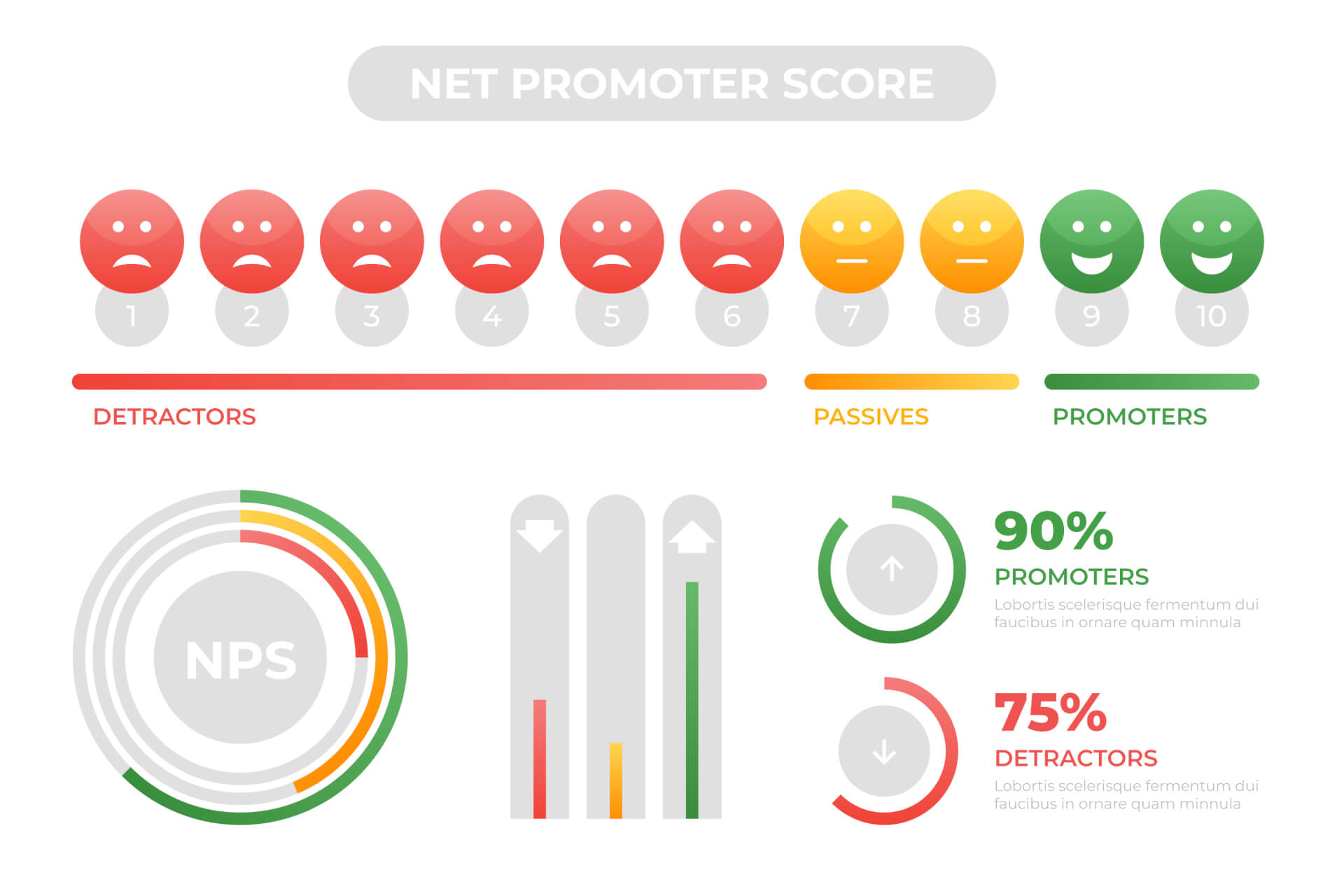
Segment your NPS survey respondents into promoters (score 9-10), passives (score 7-8), and detractors (score 0-6). Follow up with promoters to thank them for their positive feedback and encourage them to refer others to your business. For detractors, reach out to understand their concerns, address any issues, and turn them into satisfied customers.
7 - Monitor Your NPS Score Over Time
Track your NPS score regularly to monitor changes in customer sentiment and overall satisfaction. A rising NPS score indicates that your efforts to improve the customer experience are paying off, while a declining score may signal underlying issues that need to be addressed. Use this feedback loop to continuously optimize your NPS survey process.

8 - Iterate and Improve Your NPS Survey Strategy
Finally, don't be afraid to experiment and iterate on your NPS survey strategy. Test different survey formats, timing, and messaging to see what resonates best with your customers. Solicit feedback from your team members and stakeholders to gather insights and make informed decisions on how to improve your NPS survey process.
Conclusion
In conclusion, automating NPS surveys in your tech stack can help you gather valuable customer feedback, measure customer loyalty, and drive business growth. By following this step-by-step guide, you can set up an effective NPS survey process that provides actionable insights and enhances the overall customer experience.
Reading recommendation: If this article helped you and you would like to find out more about the Net Promoter Score, continue reading here: “The Net Promoter Score – Basics and Areas of Application”
FAQs
What is a good NPS score?
A good NPS score typically falls between 50-70, with scores above 70 considered excellent. However, the benchmark for a good NPS score can vary by industry and company size.
How often should I send out NPS surveys?
It's recommended to send out NPS surveys at regular intervals, such as quarterly or bi-annually, to track changes in customer sentiment over time.
Can I use NPS surveys for both B2B and B2C businesses?
Yes, NPS surveys can be used for both B2B and B2C businesses to measure customer loyalty and satisfaction across different industries.
How can I increase my NPS score?
To increase your NPS score, focus on improving customer experience, addressing customer feedback, and delivering exceptional service that exceeds customer expectations.
Are NPS surveys anonymous?
NPS surveys can be anonymous or personalized, depending on how you configure the survey tool. It's important to respect customer privacy and data protection regulations when collecting feedback through NPS surveys.